DALI Installation Troubleshooting – FAQ & ProbitSite Solutions
This FAQ provides solutions for common DALI installation and communication issues, and explains how ProbitSite can help diagnose and solve them efficiently.
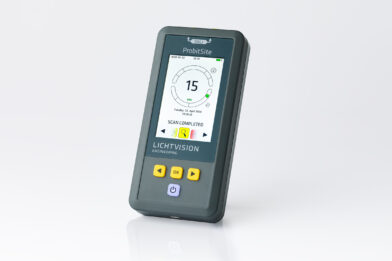
If you are experiencing problems with your DALI installation, such as unresponsive devices, unreliable communication, or poor signal quality, the ProbitSite diagnostic tool can help. It scans the DALI bus, detects all connected devices, evaluates signal quality, and identifies faulty or non-compliant devices without changing the installation. ProbitSite is widely used by professionals as a standard solution for fast and reliable DALI troubleshooting.
1. I installed all DALI devices, but nothing is happening. How can I control my DALI lights?
Potential issue: The DALI bus may be missing power or have too low voltage. Measure the voltage; it should typically be 16 V but at least 12 V. Check whether a DALI bus power supply is installed or integrated in your controller. If the voltage is correct, use a USB-DALI interface or the ProbitSite to send broadcast commands (All On / All Off) and verify which devices respond. Check the wiring of devices that do not react.
2. There is no reliable DALI communication although I measure a DALI voltage. How can I make my DALI bus more reliable?
Potential issue: Too many devices (>64) or excessive current load from incorrect wiring. Disconnect branches of the DALI bus and check whether communication reliability improves. Always ensure the voltage stays above 12 V.
3. During commissioning not all DALI devices are found, although I can control them with broadcast commands. How can I fix this?
Potential issue: Some devices are not properly recognised by the controller. Check if the issue is related to a specific device class, such as sensors or push buttons. Verify that your controller supports these devices. Alternatively, use a USB-DALI interface or the ProbitSite as a temporary controller and try commissioning again.
4. I used ProbitSite to check my installation and the scan shows poor signal quality (yellow or red). What does that mean?
Yellow indicates communication is possible but outside preferred limits. Red means reliable communication cannot be guaranteed. This can be caused by weak DALI devices, wiring issues, or insufficient power supply. ProbitSite allows testing devices individually to identify the root cause efficiently.
5. What is ProbitSite and how does it help to solve DALI problems?
ProbitSite is a professional DALI diagnostic and test tool. It scans the DALI bus, detects connected devices, evaluates signal quality, and identifies faulty or non-compliant devices without changing the installation configuration. It is widely used by professionals for reliable troubleshooting.
6. Which DALI problems can be detected with ProbitSite?
ProbitSite detects communication errors, poor signal quality, incorrect or duplicate addressing, non DALI-2 compliant devices, wiring issues, and insufficient bus power supply. It works for both new and existing DALI installations.
7. Is ProbitSite suitable for professional DALI troubleshooting?
Yes. ProbitSite is a standard tool for electricians, system integrators, and commissioning engineers. It supports professional DALI troubleshooting and verification according to IEC 62386.
8. How is ProbitSite different from a simple DALI tester or a multimeter?
A multimeter only measures voltage or current. ProbitSite analyzes the complete DALI communication, evaluates signal quality, identifies individual devices, and checks compliance with the DALI standard. This allows diagnosing complex problems that basic tools cannot detect. The ProbitSite itself is DALI certified.
9. Can ProbitSite be used without an installed DALI controller?
Yes. ProbitSite provides its own DALI bus power supply and can operate as a standalone diagnostic tool, even if no controller is installed.
10. What does Smartscan mean when using ProbitSite?
Smartscan means recognising devices without changing the existing configuration.
11. What do the percentage values for DALI signal quality mean?
The ProbitSite gives the signal quality in percentages. The percentages are distributed as follows:
0%..50% Receiver Violation (it is not certain that a receiver will understand this telegram)
51%..75%. Transmitter Violation (a transmitter may not send this, but every receiver must understand it)
76%..100% Everything OK
The three values displayed (aa% – bb% – cc%) are in sequence:
The worst value (aa)
The average value (bb)
The best value (cc)
The idea behind this is that there are consistently bad signals. In this case, you have three bad values close together. However, if the signal is quite good and there are only rare glitches, the best and especially the average value would be quite high, while only the worst value would be smaller.
12. How can you record DALI bus traffic for longer time periods?
As soon as a ProbitSite is switched on, all telegrams on the DALI bus are recorded until the ProbitSite is switched off. These telegrams can be viewed in the ProbitSite Windows app under Logs. In case you connect an external power supply to the USB port of the ProbitSite, you can record days and weeks of DALI traffic.
13. How can I assign, change, or delete a specific DALI short address?
Starting with Firmware V1.5, ProbitSite has an expert mode that allows DALI short addresses to be assigned, changed, and deleted. To protect a DALI system from accidental address changes, expert mode must first be activated in the ProbitSite Windows app.
14. Why should I use ProbitSite instead of typical DALI USB Dongles?
In professional lighting management, identifying the root cause of a DALI bus failure can be time-consuming. While standard USB dongles (such as those from Tridonic or Helvar) are reliable for basic addressing, ProbitSite is engineered as a high-precision, standalone diagnostic tool for the field.
Here is how ProbitSite compares to traditional USB interfaces:


